.png?alt=media&token=cc2e81c0-8fa4-4090-83e1-8f3276e0bc91)
How AI Voice Agents Work: From Phone Calls to Bookings and CRM Updates
Learn how AI voice agents handle calls, book appointments and update your CRM. Explore workflow examples, human handover and what to include in your build.
Published on: 2026-10-18 by Shrikant Shenoy
See how AI voice agents handle calls, trigger bookings and CRM updates, and hand over to people. Includes workflow examples and a practical hiring checklist.
A customer calls while your team is busy. They want to know whether you offer a service, when someone is available and what happens next. An AI voice agent can be designed to handle that first conversation and connect it to your business systems. The useful outcome is a correctly recorded next step, not simply a convincing voice.
An AI voice agent receives spoken audio, interprets the caller's request, uses approved information or connected tools, and speaks a response. With the right integrations, the agent can check appointment availability, create a booking, update a CRM or transfer the call. Those actions require configured workflows, permissions and confirmed results; a prompt alone does not connect your business systems.
What happens when someone calls an AI voice agent?
A common architecture connects a telephone service, speech recognition, a language model, business tools and speech generation. The telephone service carries the call. Speech recognition converts audio into text, the application decides how to respond, and text-to-speech turns the response into audio. Architectures vary, so this sequence is an explanation of one common approach.
For example, Twilio ConversationRelay handles speech recognition and speech generation while a connected application supplies responses. Choosing a voice is only part of the build. The conversation also needs turn-taking, a way to recover from misheard details and rules for when to involve a person.
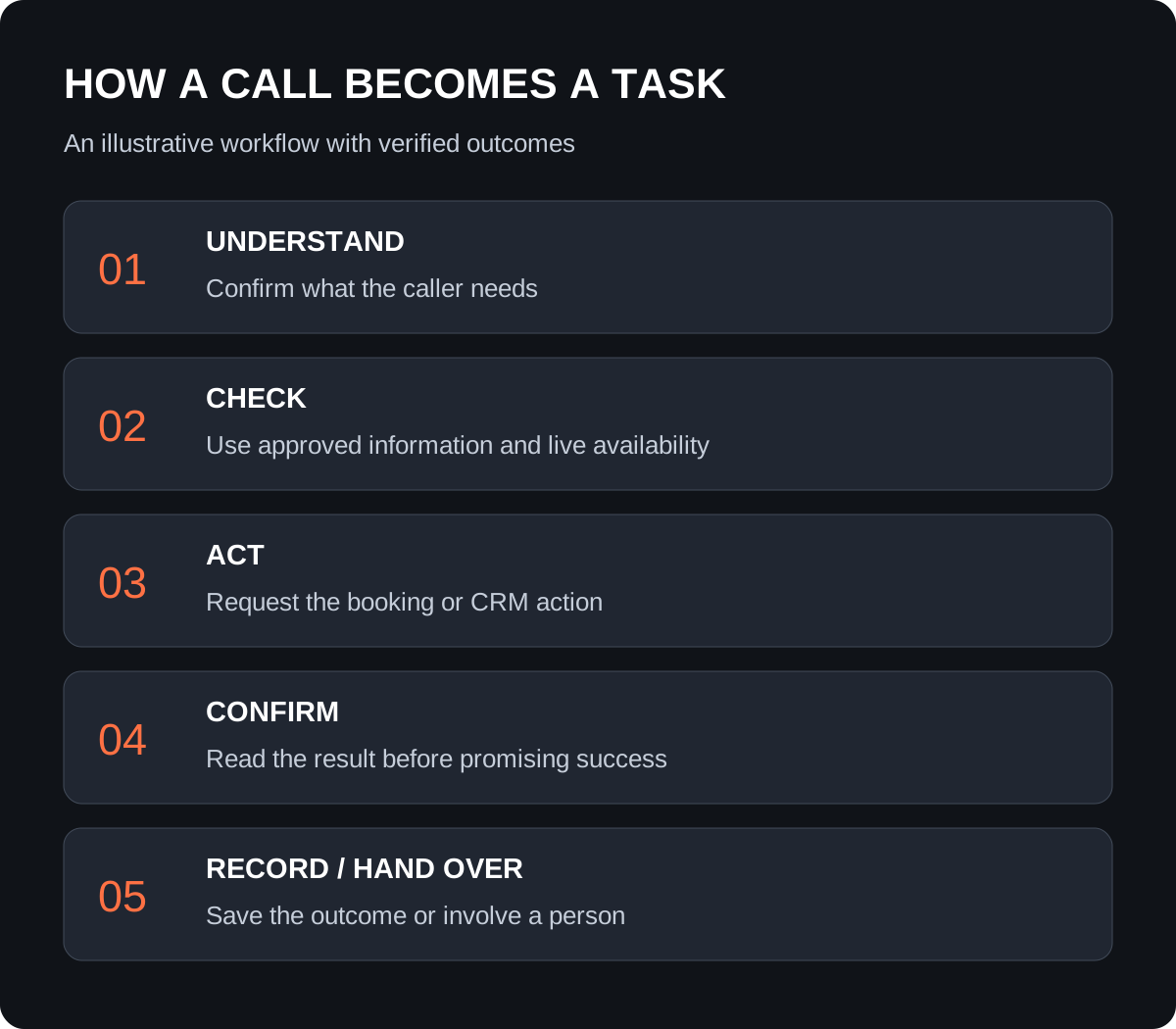
How does a conversation trigger real automation?
The application gives the agent a defined set of tools: for example, check availability, create a contact or transfer a call. A tool is a controlled connection to a business function. It is not unrestricted access to everything in your account.
In Vapi's tool model, the assistant can request an action, the connected tool executes it, and a result returns. Caller-influenced values still need validation at the destination. A booking request should therefore check the required details and availability in the booking system rather than trust whatever the conversation model proposes.
A workflow platform can coordinate several steps. For example, an authenticated request can start an n8n workflow that updates a record and returns a result. n8n's webhook documentation explains this request-and-response pattern and distinguishes test URLs from production URLs. Your developer must connect the correct live endpoint and test the complete path.
What would an appointment-booking call look like?
Hypothetical example: a prospect calls a service business to arrange a consultation. This example illustrates a proposed workflow, not a client result.
- Introduce the assistant. The agent identifies itself as an automated assistant for the business and asks what the caller needs.
- Confirm the request. The agent checks the requested service and collects only the contact details needed for the next step.
- Read actual availability. A connected tool retrieves available slots, including the correct time zone.
- Confirm before booking. The agent repeats the selected date, time and relevant details, then asks for confirmation.
- Create and verify. The booking system returns a result. Only a successful result allows the agent to say the appointment is booked.
- Record and route. The workflow updates the CRM, assigns the next action and sends any agreed confirmation through an appropriate channel.
If the booking system fails, the agent should say it could not confirm the appointment and offer the agreed alternative, such as a callback request. It should not invent availability or promise that a member of staff will call at a specific time unless that commitment is supported.
Which voice-agent workflows are worth considering?
Start with a narrow task whose outcome you can verify. The examples below are possible project scopes, not features automatically included with every platform.
| Caller need | Connected workflow | Evidence of completion |
|---|---|---|
| Ask a service question | Retrieve approved business information | Answer matches the current source; unknown questions are escalated |
| Book a consultation | Check availability and create a booking | Confirmed booking record with the agreed time zone |
| Request a quote | Capture requirements and assign a sales task | CRM record and named owner, without an invented price |
| Speak to the team | Transfer to an approved destination | Connection succeeds or the fallback request is recorded |
| Call outside office hours | Capture a callback request | Request stored with an owner and realistic follow-up expectation |
For a CRM connection, agree on matching rules for repeat callers and what information should be retained. Our CRM implementation checklist explains how to turn those decisions into a scope you can test.
When should the AI voice agent hand over to a person?
Plan human handover for requests outside the approved scope, repeated misunderstandings, tool failures and callers who ask for a person. The agent should not keep improvising to avoid transferring the call.
Transfer behavior depends on the provider and telephone setup. Vapi's transfer documentation describes routing calls to configured destinations. Ask your developer to demonstrate both a successful connection and an unavailable destination. Define whether a brief summary accompanies the transfer and how a callback is handled when nobody answers.
Keep account-specific information behind appropriate verification. Speaking a name or telephone number does not, by itself, establish that a caller may access private records. Decide what the agent may disclose, change or escalate before connecting customer systems.
What should you test before accepting the build?
Ask for a pilot that proves business outcomes, not just a polished demo conversation. Use dummy data and agreed test accounts.
- Can a caller complete the main task and correct a misheard name or time?
- Does an interruption stop or redirect the response appropriately?
- Does a failed booking remain unconfirmed rather than being announced as successful?
- Do repeat requests avoid duplicate bookings and CRM tasks?
- Can the caller reach a person, and does the fallback work when that person is unavailable?
- Can your team identify a failed action and understand who needs to resolve it?
Separate a completed call from a successful booking, a qualified enquiry and a customer. Review errors and outcomes during the pilot before expanding coverage. Agree on recording, retention, access and communication permissions for the actual markets served. Outbound calling needs a separate review; an inbound reception workflow is not permission to launch automated marketing calls.
What affects the cost of an AI voice-agent project?
Cost depends on the workflow, integrations, languages, call volume, call duration, testing and ongoing support. Separate the one-time build from recurring telephone, voice-platform, model, hosting and automation charges. Ask how transfers and failed calls are billed by the proposed providers.
A simple enquiry-capture pilot and a voice agent that changes customer records or manages several calendars are different scopes. Request milestones for conversation design, integration, testing, deployment and handover. Keep business account ownership, support responsibilities and the process for updating approved answers explicit.
Hire Diginfotech Solutions to build your AI voice agent
If you want an AI voice agent connected to your business workflow, Discuss Your Project with Shrikant Shenoy at Diginfotech Solutions. Share your website, the calls you want handled, current phone and CRM tools, preferred languages, estimated call volume, target market, timeline and indicative budget.
Start with one useful outcome: capturing enquiries, arranging consultations or routing calls to the right person. Use the project discussion to agree on platform fit, integrations, acceptance tests and what happens when the agent cannot complete a task. Do not send passwords or customer recordings in the initial enquiry.
Diginfotech Solutions is based in Thane, India, and serves Indian and international clients. Explore our marketing automation and CRM integration services, and read our company information before discussing the build.
Enjoyed this article?
Add Diginfotech Solutions as a Preferred Source on Google to see more of our content in Search.