.png?alt=media&token=cc2e81c0-8fa4-4090-83e1-8f3276e0bc91)
Website Not Generating Leads? 5 Things to Fix Before Spending More on Ads
Website getting traffic but no enquiries? Check your offer, forms, ads and follow-up before spending more. A practical guide for business owners.
Published on: 2026-10-17 by Shrikant Shenoy
Getting traffic but few useful enquiries? Diagnose your offer, customer journey, traffic intent, measurement and follow-up before increasing ad spend.
Your website is live. Marketing brings visitors. Yet the inbox is quiet, or the enquiries are unrelated to the work you want. Before buying more traffic, identify where the journey from visitor to customer breaks. This guide is for business owners with few suitable enquiries, unreliable website workflows or an unfinished AI-built site.
A website can receive traffic without generating enquiries because the visitors are unsuitable, the offer is unclear, a form or booking flow fails, measurement counts the wrong actions, or follow-up misses genuine prospects. These are possibilities to investigate, not a diagnosis of your website. Start by testing one complete customer journey and comparing traffic, received enquiries and sales outcomes.
Where is your website losing potential customers?
Locate the earliest confirmed break before choosing a fix. A visitor who never needs your service and a suitable buyer whose form submission disappears require different work. Use the table to decide what evidence to collect.
| What you are seeing | What to check first | What evidence to collect |
|---|---|---|
| Very few relevant visitors | Discovery, search intent and markets served | Landing pages, available search queries and visitor locations over a defined period |
| Visitors but few enquiries | Offer clarity and the path to contact | Mobile journey recording, page copy and contact-step failures |
| Form submissions never reach the team | Storage, delivery and notifications | A labeled test traced from submission to the receiving inbox or CRM |
| Enquiries are unsuitable | Traffic intent, ad promises and service scope | Specific disqualification reasons alongside the page and source |
| Suitable enquiries do not progress | Ownership, response and the proposed next step | Assigned owner, contact attempts, proposal status and lost reasons |
1. Does your offer make the buying decision clear?
A useful service page tells a prospective buyer what you do, who the service suits and what happens after they enquire. If those answers are missing, improve the offer before assuming the design needs replacing.
Read the page as someone who has never heard of your business. Can they identify the problem you solve, likely deliverables, important exclusions and the next step? Place genuine project evidence near the relevant service. Explain your role in the work; a logo or unsupported performance claim does not establish what you delivered.
Hypothetical copy example: “We build innovative digital experiences” gives a buyer little to assess. “We repair website forms and booking flows, verify enquiry delivery and hand over the working configuration” describes a concrete service. Use only wording that accurately reflects what your business can provide.
Choose one primary action for the page, such as requesting a project discussion. Explain what information to send and what the discussion covers. Secondary navigation can remain, but competing buttons should not leave the visitor guessing which route fits their need.
2. Does the website work beyond the success message?
A convincing interface does not prove that the customer journey works. Test the live domain from the visitor's first click through to the record your team receives. A success message alone cannot confirm that a submission was stored, delivered or assigned.
Use a labeled test enquiry with dummy information. Check mobile navigation, required fields, error messages and the receiving system. Verify that the correct person can find the enquiry. For booking, check availability, time zone, confirmation and cancellation. Where accounts or payments are part of the journey, test access and payment outcomes in an appropriate test environment.
AI-built websites can be repaired like other software; their origin is not proof of a defect. The important questions are which workflows work, which fail and what evidence demonstrates the repair. A frontend can look complete while a server connection, permission or production setting remains unfinished. Our AI-built website repair guide explains how to scope that investigation.
Check measurement separately. Google Analytics DebugView helps inspect events received during testing. Seeing an analytics event is evidence about tracking, not proof that a CRM record or email arrived. A developer may need to inspect server errors and delivery logs when these checks disagree.
3. Are visitors looking for the service you sell?
Traffic is useful when the visitor's need connects to your offer. An informational guide can help someone learn and later buy, but a visit to that guide is not automatically a purchase-ready enquiry.
Review the pages attracting visitors and the questions those pages answer. A tutorial for people doing a task themselves serves a different immediate purpose from a page explaining paid implementation. Keep helpful educational content, then offer a relevant path to service scope, cost factors, project evidence and contact.
State the locations and delivery arrangements you actually support. If work is remote, explain how scope approval and communication will work. Avoid adding city pages that imply offices or local experience you do not have.
For paid search, review the queries available in Google Ads' search terms report against the ad and landing page. The report does not disclose every query, so treat it as partial evidence. Investigate repeated mismatches rather than judging a campaign from one unsuitable enquiry.
For AI discovery, make answers specific, factual and linked to relevant services. Google says its AI search features use existing SEO foundations and do not require special AI files or schema; eligibility does not guarantee inclusion. See Google's AI features guidance. That guidance describes Google, not a universal rule for every AI chatbot. Clear content supports understanding; it cannot compel a system to cite you.
4. Do your ads measure enquiries or actual lead quality?
Measure the stages separately. A click is an interaction with an ad or link. An enquiry is a genuine request received by your business. A qualified lead meets agreed criteria such as service fit and project readiness. A customer has bought from you. A page view, download or job application is not automatically a qualified sales lead.
Hypothetical example, not a client result or benchmark: a business spends $600 on advertising, receives 20 enquiries, qualifies five and gains one customer from those enquiries. The costs are $600 ÷ 20 = $30 per enquiry; $600 ÷ 5 = $120 per qualified lead; and $600 ÷ 1 = $600 advertising cost per customer, excluding management fees and other costs.
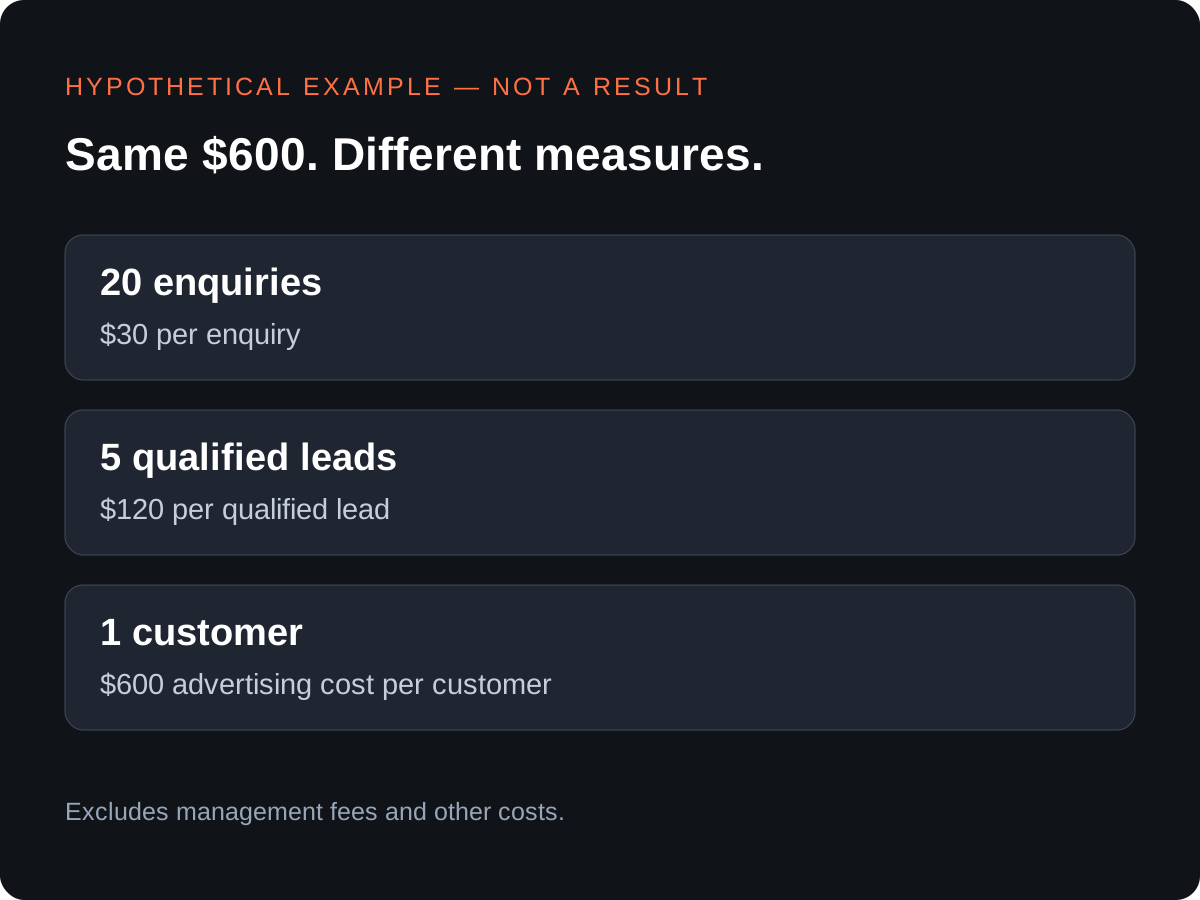
Follow the same group of enquiries through the sales process. Do not compare this month's spend with unrelated customers acquired earlier. Keep undecided opportunities open, and record actual counts when the sample is small.
Google Ads supports qualified-lead and converted-lead goals using offline outcomes, as described in Google's lead-conversion documentation. Your business still needs clear definitions and a checked implementation. For a deeper campaign review, use our Google Ads lead-quality checklist.
5. Does every suitable enquiry have an owner?
Reliable follow-up requires a received record, a responsible person and a next action. An automated acknowledgement confirms receipt only if it reflects a successful submission; it does not replace a useful human response.
Map the handoff: capture the enquiry, create or update the CRM record, assign an owner, acknowledge receipt where appropriate and create the next task. Add an alert for failed delivery or assignment. Decide how repeat enquiries are matched so automation does not create duplicate tasks or overwrite useful history.
Keep a person responsible for reviewing exceptions and correcting mistakes. Respect communication permissions and the applicable rules for the channel and market; submitting an enquiry should not be treated as unlimited permission for unrelated campaigns. Our marketing automation service can be discussed around these workflow requirements. The CRM implementation checklist helps define acceptance tests.
What can you check yourself before hiring anyone?
Start with observable evidence you can share with a specialist. Record the date, device and result of each check, without including passwords or private customer information.
- Open the priority landing page on your phone and follow its main contact route.
- Ask someone unfamiliar with the business to describe the offer and next step.
- Send one labeled test enquiry and confirm receipt with the responsible person.
- Check booking details and time zones if appointments are offered.
- Review a recent group of enquiries for fit, ownership and outcome.
- List what each reported conversion actually counts.
- Write down the first confirmed failure and the evidence supporting it.
What should you fix first?
Fix a blocking technical failure first: people cannot enquire through a broken form. If the journey works but buyers cannot understand the offer, improve the page's clarity. If the offer is clear but visitors consistently want something else, investigate acquisition. If suitable enquiries arrive and stall, repair the follow-up process.
Website repair restores a failing function. Conversion improvement helps suitable visitors decide and act. Traffic acquisition brings relevant visitors. Lead follow-up moves received enquiries toward a decision. Buying one does not automatically solve the others.
Owners can test journeys and review copy. Authentication, payment handling, server failures and data integrations may need specialist work. Request a defined scope, evidence of completion and a handover plan rather than approving an unexplained rebuild.
Frequently asked questions
Do I need a new website, or can the existing one be repaired?
Start with diagnosis. Repair may be enough when the existing site supports the required workflows. Consider rebuilding when documented limitations make repair unsuitable; ask for the reasoning and alternatives.
Should I increase my advertising budget?
Not solely because enquiries are low. First check delivery, targeting and outcomes. Increase spend only with a clear reason and a way to evaluate the additional results.
Can an AI-built website be repaired?
Yes, depending on access to its code, platform and integrations. A technical review should identify what can be retained and what needs correction.
What information is needed for a repair quote?
Share the website URL, steps that reproduce the problem, platform, desired outcome, timeline and indicative budget. Grant any necessary technical access through an agreed secure process.
Can SEO or AI search visibility guarantee customers?
No. Visibility can create opportunities, but purchases also depend on fit, trust, delivery, pricing and follow-up. Rankings and citations are not guaranteed outcomes.
Discuss the problem you want fixed
Discuss Your Project with Diginfotech Solutions. Send your website URL, the problem you want fixed, target market, timeline and indicative budget. Include any non-sensitive test evidence so the conversation starts with a specific problem.
Diginfotech Solutions is based in Thane, India, and serves Indian and international clients. Review our services and company information to assess fit. The next step is agreeing what needs investigation and what a successful fix would demonstrate.
Enjoyed this article?
Add Diginfotech Solutions as a Preferred Source on Google to see more of our content in Search.